LLM Routing on SayGM: Cheapest or Fastest Provider
SayGM now lets you choose how your requests are routed. Send each one to the cheapest or fastest provider for your model with a single header, while sticky routing keeps your prompt cache warm.
BSBrittany Seales· Marketing5 min read
On this page
SayGM now lets you control LLM routing for your own requests. When a model is offered by more than one provider, you can choose to send it to whichever is cheapest right now, or whichever is responding fastest, instead of leaving that choice to the gateway. Your model stays the same, your SDK stays the same, and there's no second account to manage.
That matters because the same model is often served by more than one provider. GPT, Claude, and many open-weight models can each be reached through several clouds and inference hosts, and those hosts don't all charge the same or perform the same on any given afternoon. Until now, which one served your request was SayGM's call which balanced price, speed and reliability to choose a provider for you. Now it can be yours.
This post covers what LLM routing actually means (it's not always what search results suggest), how SayGM's two new headers work, how conversation stickiness protects your prompt cache, and when each mode is the right choice. If you're new to SayGM, start with how one OpenAI-compatible API reaches Claude, GPT, and Gemini.
Table of Contents
- What Is LLM Routing?
- Provider Routing vs. Model Routing
- How Do SayGM's Routing Headers Work?
- Why Sticky Routing Keeps Your Prompt Cache Warm
- When to Use Cheapest, Fastest, or Default
- Common Questions About LLM Routing
- Summary
- About SayGM
What Is LLM Routing?
LLM routing is the decision about where an AI request goes before it's answered. Every time your app calls a model through a gateway, something has to pick a destination. Sometimes that's a choice between models. Sometimes it's a choice between providers that all run the same model. Either way, the routing decision shapes what you pay and how long you wait.
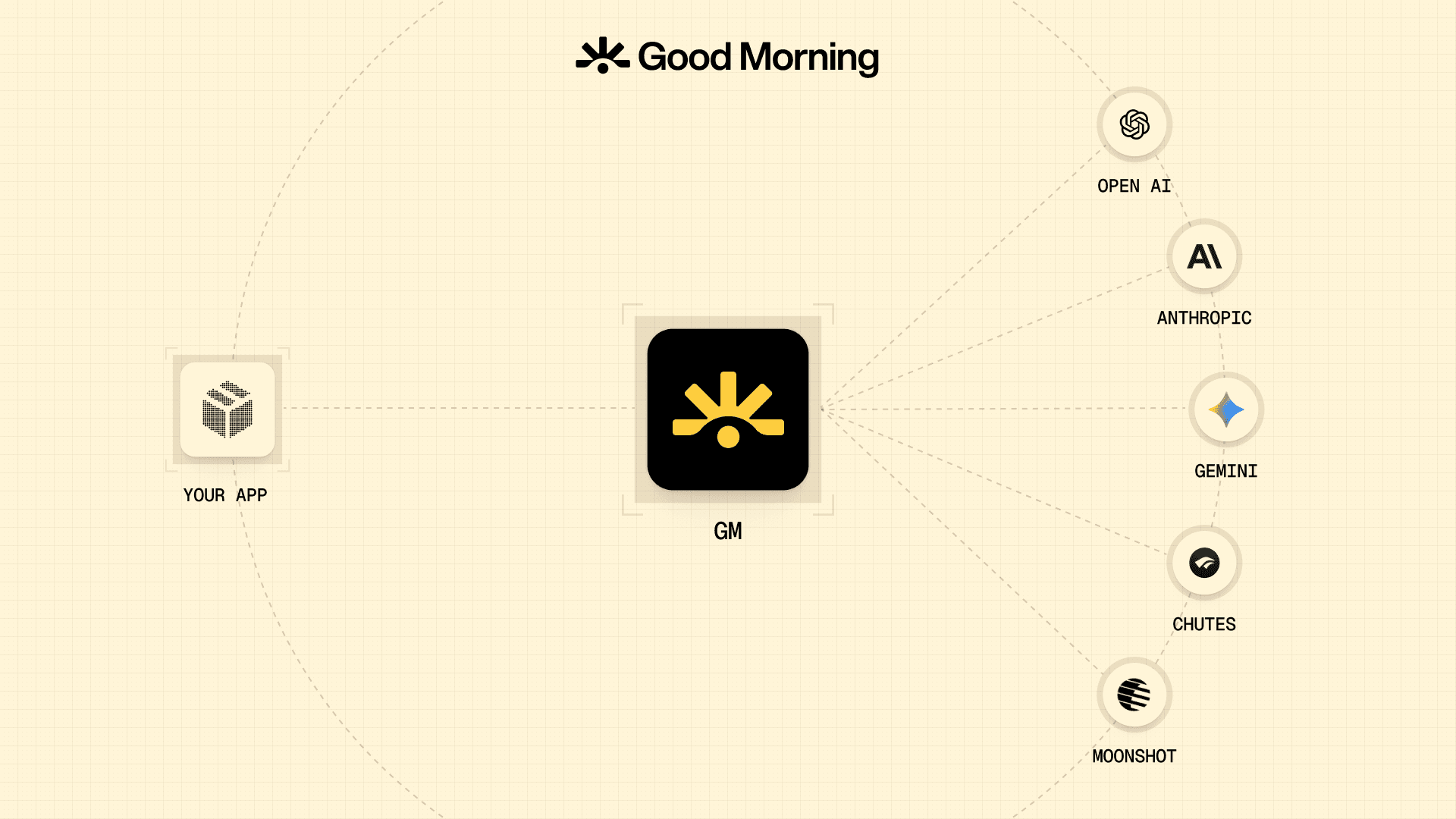
The above image shows an example of routing to different models, however the routing also goes deeper; within the models there are several providers.
Most developers never see this decision. A gateway makes it behind the scenes and returns a response. That works fine until you notice that one week's bill is higher than expected, or that streaming responses feel slower than they did yesterday. At that point you want a say in the matter, and an LLM router that exposes its choices is far more useful than one that hides them.
Provider Routing vs. Model Routing
Search for "LLM routing" and most of what comes back is about model routing: picking a smaller, cheaper model for easy prompts and a larger one for hard prompts. Projects like RouteLLM from LMSYS are built around exactly that idea, and it's a useful technique when you're happy for the model to change from one request to the next.
Provider routing solves a different problem. You've already chosen the model, maybe because your evals depend on it or your product is tuned to it. What's left to decide is which provider serves it (e.g. Near AI, Chutes etc). The answer is identical in kind, but the price and speed of getting it are not.
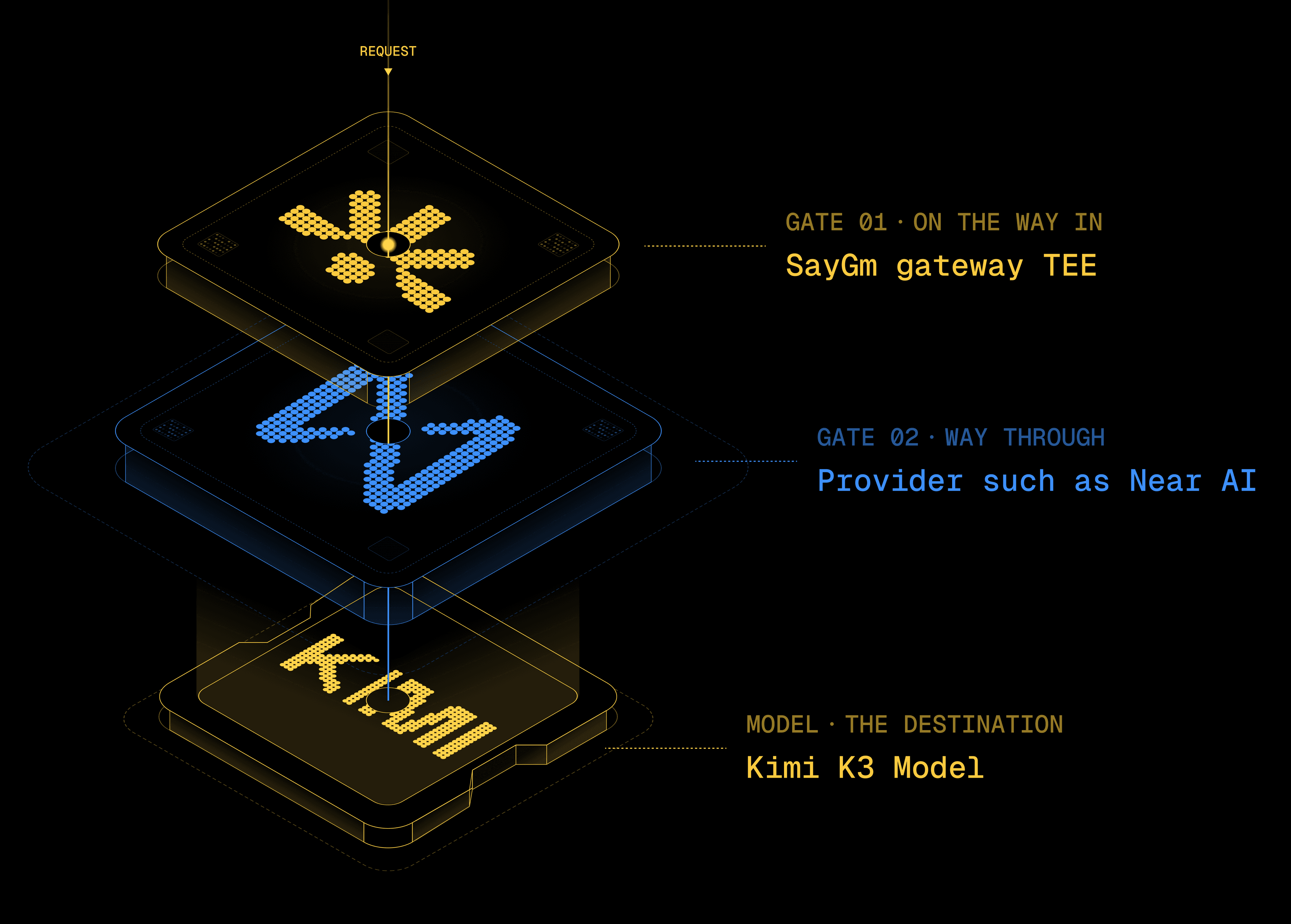
SayGM's new routing controls are provider routing. Your model stays exactly the same. Only the path to it changes.
How Do SayGM's Routing Headers Work?
There are two optional headers. You can use either one on its own or both together, and leaving them out keeps everything working the way it does today.
X-GM-Routing sets the strategy. It accepts three values:
defaultuses SayGM's standard routing for the model. This is what you get if the header is missing.cheapestsends the request to the provider with the lowest expected charge, favouring providers with a strong recent success rate.fastestsends the request to the provider with the quickest recent time to first token and output speed.
Both cheapest and fastest are based on recent prices and performance, not a fixed ranking. What you're actually charged is the settled cost returned with each response.
X-GM-Providers narrows the field. Pass a comma-separated list of up to 16 provider names, and only those providers can receive the request. Provider names cover cloud platforms such as bedrock, azure, and foundry, model makers such as anthropic, openai, and google, and inference hosts such as kubetee, chutes, near, and deepinfra. This is useful when your security team has already approved one cloud and not another, or when you want to test a single provider in isolation.
Both headers work on a plain HTTP request or as default headers in the OpenAI and Anthropic SDKs. That means you can set one strategy for your whole app and still override it on a single request when you need to. The routing documentation has copy-and-paste examples for each.
Whatever provider you pick, the request still travels through SayGM's gateway, which runs inside an Intel TDX trusted execution environment. Routing changes who serves the model. It doesn't change the fact that SayGM and the host it runs on can't read the request on its way there. For closed frontier models, the provider you route to still receives the prompt, the same as it would with any gateway.
Why Sticky Routing Keeps Your Prompt Cache Warm
Switching providers on every turn of a conversation sounds efficient. In practice it would cost you.
Most major providers cache the start of a prompt that they've seen recently, so the long system prompt or chat history you send on turn five doesn't get fully reprocessed. OpenAI's prompt caching guide describes cached input as both cheaper and faster, since less work happens before the response begins. That cache lives with the provider. Jump to a different provider mid-conversation and you start cold.
So SayGM keeps a conversation on the same provider while that provider stays available. Your routing mode picks a provider at three moments only: at the start of a conversation, after five minutes of inactivity, or when the previous provider becomes unavailable. Everything in between stays put, which means later turns stay fast and cheap instead of paying full price to rebuild context.
For agentic workloads and coding tools, where a single session can run dozens of turns against a long context, this is often where the real savings are.
When to Use Cheapest, Fastest, or Default
Each mode suits a different kind of workload, and you can mix them across one app.
Cheapest fits work where nobody is watching a cursor blink. Batch summarisation, document processing, evaluation runs, and background agents all care far more about cost per token than about the first token arriving a fraction of a second sooner. If you've been hunting for the cheapest LLM API for a model you've already settled on, this does that comparison for you on every new conversation.
Fastest fits anything interactive. Chat interfaces, autocomplete, and coding assistants live or die on time to first token, because that's the gap users actually feel. If you're running SayGM inside tools like Cursor, Cline, or Claude Code (all covered on our integrations page), fastest is a sensible default for the interactive parts.
Default is the right choice when you don't have a strong preference, or when you're about to use features that routing modes don't support. Routing modes only work with single-model requests. Fusion and multi-model cascade requests, and some multimodal requests, return an HTTP 400 if you add a routing mode.
Not sure which models are offered by more than one provider? The model catalog lists what's available, along with live pricing.
Common Questions About LLM Routing
Is LLM routing the same as using an LLM router?
Not always. "LLM router" usually describes a tool that chooses between models. Provider routing chooses between hosts of one model. SayGM's headers do the second. Your model never changes unless you change it.
Does OpenRouter offer provider routing too?
Yes. OpenRouter's provider routing lets you sort by price, throughput, or latency and set allow and deny lists, and it's a mature, well-documented option. SayGM takes a similar idea and puts it in two headers, with every request passing through a hardware-attested gateway. Our SayGM vs. OpenRouter comparison covers the wider differences.
What happens if none of my chosen providers offers the model?
You'll get an HTTP 400 with the code no_allowed_provider, and the error message lists which providers currently serve that model. A list SayGM can't parse returns invalid_provider_restriction. If every allowed provider is busy, you'll see a 503.
Will cheapest mode pick an unreliable provider just to save money?
It favours providers with a strong recent success rate, so a provider that's cheap but failing shouldn't win the choice.
Summary
- LLM routing decides where a request goes. Provider routing keeps your model and changes who serves it.
X-GM-Routing: cheapestpicks the lowest expected charge.X-GM-Routing: fastestpicks the quickest recent time to first token and output speed.X-GM-Providerslimits requests to up to 16 providers you name.- Conversations stick to one provider until five minutes of inactivity or an outage, so prompt caching keeps working.
- Routing modes work on single-model requests only, and every request still passes through SayGM's TEE gateway.
Pick a mode, add one header, and see what it does to your next bill or your next stream. Get an API key and read the routing docs to get started.
About SayGM
SayGM is a drop-in inference gateway for teams who don't want to just take a company's word that their prompts are private. Every request is routed through a hardware-verified confidential environment - not even SayGM can see what's inside it. That's not a policy, it's provable. Swap in your existing OpenAI, Anthropic, or Gemini code and you're covered in minutes, at transparent, published rates with no hidden markup.
Say gm to AI at saygm.com.
- AI
- Routing
BS