Build an AI chatbot for your website with the Vercel AI SDK, on Claude or an open model
Build an AI chatbot for your website with the Vercel AI SDK. Stream replies from an open model through an OpenAI compatible endpoint, or from Claude, on one key.
9 min read · TypeScript · Verified on Sep 26, 2026
The project
Your website gets the same questions every day: do you ship to Canada, how long does delivery take, can I return this. A small chat box on the page can answer them the moment someone asks.
In this tutorial we build that chat box with the Vercel AI SDK: a plain Node server with a chat route, and a page that shows the reply as it streams in. It answers with a fast open model, and a second route answers with Claude.
At the end you open the page in your browser, type a question, and watch the answer arrive piece by piece.
What you'll learn
- How to stream a model's reply from a Node route with
streamText. - How to read a streamed reply in the browser and write it to the page safely.
- How to serve an open model and Claude from the same server on one key.
How it works
The browser talks only to your server. Your server holds the key and calls the model through SayGM, so the key stays off the page.
What you need
- Node 22.18 or later.
- A SayGM key in the
SAYGM_API_KEYenvironment variable.
Setup
Install the AI SDK and its OpenAI and Anthropic providers.
npm install @ai-sdk/[email protected] @ai-sdk/[email protected] [email protected]Create both providers with the base URL https://api.saygm.com/v1 and the key from the environment.
import { readFile } from "node:fs/promises";
import { createServer } from "node:http";
import type { IncomingMessage, ServerResponse } from "node:http";
import type { AddressInfo } from "node:net";
import { createAnthropic } from "@ai-sdk/anthropic";
import { createOpenAI } from "@ai-sdk/openai";
import { streamText } from "ai";
import type { LanguageModel, ModelMessage } from "ai";

const apiKey = process.env.SAYGM_API_KEY;
if (!apiKey) {
  throw new Error("Set SAYGM_API_KEY to your SayGM key.");
}

const saygm = createOpenAI({ baseURL: "https://api.saygm.com/v1", apiKey });
const anthropic = createAnthropic({ baseURL: "https://api.saygm.com/v1", apiKey });
Steps
Handle a chat request
readMessages keeps only user and assistant text, and only the recent turns. chatRoute streams the reply back as plain text. Capping the body and the history keeps every request small, whatever a visitor sends.
const MAX_BODY_BYTES = 64_000;
const MAX_MESSAGES = 20;

async function readMessages(request: IncomingMessage): Promise<ModelMessage[]> {
  const chunks: Buffer[] = [];
  let size = 0;
  for await (const chunk of request as AsyncIterable<Buffer>) {
    size += chunk.length;
    if (size > MAX_BODY_BYTES) {
      throw new Error("Request body too large");
    }
    chunks.push(chunk);
  }
  const { messages } = JSON.parse(Buffer.concat(chunks).toString("utf8")) as {
    messages: unknown[];
  };
  return messages
    .filter(
      (message): message is ModelMessage =>
        typeof message === "object" &&
        message !== null &&
        "role" in message &&
        (message.role === "user" || message.role === "assistant") &&
        "content" in message &&
        typeof message.content === "string",
    )
    .slice(-MAX_MESSAGES);
}

function chatRoute(model: LanguageModel) {
  return async (request: IncomingMessage, response: ServerResponse) => {
    // A JSON content type forces a CORS preflight, so other sites cannot post to this route.
    const [contentType] = (request.headers["content-type"] ?? "").split(";");
    if (contentType?.trim() !== "application/json") {
      response.writeHead(415).end();
      return;
    }
    const result = streamText({
      model,
      system: "You are a friendly assistant on an online shop's website. Keep answers short.",
      messages: await readMessages(request),
      maxOutputTokens: 400,
    });
    for await (const part of result.fullStream) {
      if (part.type === "error") {
        console.error(part.error);
        if (response.headersSent) {
          response.destroy();
        } else {
          response.writeHead(502).end();
        }
        return;
      }
      if (part.type === "text-delta") {
        if (!response.headersSent) {
          response.writeHead(200, { "content-type": "text/plain; charset=utf-8" });
        }
        response.write(part.text);
      }
    }
    response.end();
  };
}
Answer with an open model
saygm.chat() sends the request to Chat Completions, which open models serve. This route uses deepseek-v4-flash-0731. Short website questions suit a fast open model.
const routes: Record<string, ReturnType<typeof chatRoute>> = {
  "/api/chat": chatRoute(saygm.chat("deepseek-v4-flash-0731")),
};
Add a Claude route
Claude models use the Messages API, so this route uses @ai-sdk/anthropic and claude-haiku-4-5.
routes["/api/chat/claude"] = chatRoute(anthropic("claude-haiku-4-5"));Serve the routes and the page
A plain Node server answers the chat routes and serves the two browser files.
const files: Record<string, [string, string]> = {
  "/": ["index.html", "text/html"],
  "/chat.js": ["chat.js", "text/javascript"],
};

const server = createServer(async (request, response) => {
  const route = routes[request.url ?? ""];
  const file = files[request.url ?? ""];
  try {
    if (request.method === "POST" && route) {
      await route(request, response);
    } else if (request.method === "GET" && file) {
      const [name, type] = file;
      response.writeHead(200, { "content-type": type });
      response.end(await readFile(new URL(name, import.meta.url)));
    } else {
      response.writeHead(404).end();
    }
  } catch (error) {
    console.error(error);
    response.writeHead(400).end();
  }
});

server.listen(Number(process.env.PORT ?? 3000), "127.0.0.1", () => {
  const { port } = server.address() as AddressInfo;
  console.log(`Chatbot running at http://localhost:${port}`);
});
Stream the reply in the browser
streamChat posts the conversation and calls back with each piece of text as it arrives. Save it as chat.js. Showing text as it arrives makes the bot feel quick, even when the whole answer takes a few seconds.
/**
 * Sends the conversation to the chat route and calls onText as each piece of the reply arrives.
 *
 * @param {string} url
 * @param {Array<{ role: "user" | "assistant", content: string }>} messages
 * @param {(text: string) => void} onText
 * @returns {Promise<string>} the full reply
 */
export async function streamChat(url, messages, onText) {
  const response = await fetch(url, {
    method: "POST",
    headers: { "content-type": "application/json" },
    body: JSON.stringify({ messages }),
  });
  if (!response.ok || !response.body) {
    throw new Error(`Chat request failed with status ${response.status}`);
  }
  const reader = response.body.pipeThrough(new TextDecoderStream()).getReader();
  let reply = "";
  for (;;) {
    const { done, value } = await reader.read();
    if (done) {
      return reply;
    }
    reply += value;
    onText(value);
  }
}
Add the chat page
The page keeps the conversation and writes each reply with textContent, so model output always shows as plain text. Save it as index.html.
<div id="log"></div>
<form id="form">
  <input id="input" autocomplete="off" placeholder="Ask a question" maxlength="1000" required />
  <button id="send">Send</button>
</form>
<script type="module">
  import { streamChat } from "/chat.js";

  const MAX_HISTORY = 20;
  const messages = [];
  const log = document.getElementById("log");
  const input = document.getElementById("input");
  const send = document.getElementById("send");

  document.getElementById("form").addEventListener("submit", async (event) => {
    event.preventDefault();
    send.disabled = true;
    const question = { role: "user", content: input.value };
    messages.push(question);
    log.append(
      Object.assign(document.createElement("p"), { textContent: `You: ${input.value}` }),
    );
    input.value = "";

    const reply = document.createElement("p");
    log.append(reply);
    try {
      const text = await streamChat("/api/chat", messages.slice(-MAX_HISTORY), (chunk) => {
        reply.textContent += chunk;
      });
      messages.push({ role: "assistant", content: text });
    } catch {
      messages.splice(messages.indexOf(question), 1);
      reply.textContent = "Sorry, something went wrong. Please try again.";
    } finally {
      send.disabled = false;
    }
  });
</script>
Run it
Put the server code in main.ts in the order above, next to chat.js and index.html. Export your key, run it, and open the address it prints.
node main.tsWhat you'll see
The server prints its address. Open it, ask a question, and the open model's answer streams in under it. The page is plain HTML, ready for your own styles.
$ node main.ts
Chatbot running at http://localhost:3000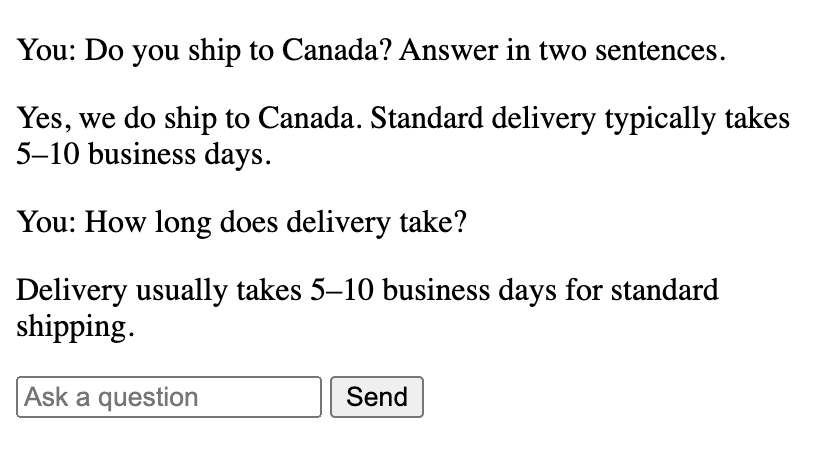
Where this stops
The bot answers from general knowledge, so the delivery time in the screenshot is the model's guess. Put your real shipping and returns policy in the system prompt, or give it tools as in the customer support tutorial, before it talks to customers.
A public chat route also needs a rate limit for each visitor, so one visitor cannot run up your bill.
Take it further
- Write your shipping and returns policy into the system prompt and ask the same questions again.
- Add a switch on the page that sends a question to the Claude route.
- Move the two routes into your existing Next.js or Express app.
- Save each conversation so you can see which questions visitors ask most.
What it costs
You pay per token, from a prepaid balance. SayGM rates are live and typically below list. USD per 1M tokens, uncached input / output. SayGM’s side is the best rate a provider offered, as of 45 minutes ago.
The last verified run of this example used 122 tokens, which costs less than one centat today’s SayGM rates.
Swap the model
Change the model id in the code to any model that serves the same API, such as a larger model for harder prompts or a confidential model for private data. This tutorial uses:
- deepseek-v4-flash-0731 on the Chat Completions API
- claude-haiku-4-5 on the Messages API
Every model, its API and its live rate is on the models page.
Next steps
Questions
- Is SayGM an OpenAI compatible API?
- For open models and GPT, yes. Point createOpenAI at https://api.saygm.com/v1 and call saygm.chat() for Chat Completions. For Claude, use @ai-sdk/anthropic with the same key.
- Can I use Claude with createOpenAI?
- Use @ai-sdk/anthropic for Claude. Claude models serve the Messages API, and that provider speaks it.
- Does the chatbot remember the conversation?
- The page sends the conversation with each message. The server keeps the last 20 user and assistant messages and caps the request size.
- Can I put this in a Next.js app?
- Yes. The chat route is a plain function around streamText, so it moves into a Next.js route handler with the same provider setup.
- How am I billed?
- Per token, from a prepaid SayGM balance. The rates on this page are live and typically below list.
Sources
- AI SDK: OpenAI provider, checked Sep 26, 2026
- AI SDK: Anthropic provider, checked Sep 26, 2026
- AI SDK: streamText reference, checked Sep 26, 2026
Run it with your own key.
One SayGM key works for every model in this tutorial. Top up once and pay per token.